Hillstone: A Playful Handwritten Font
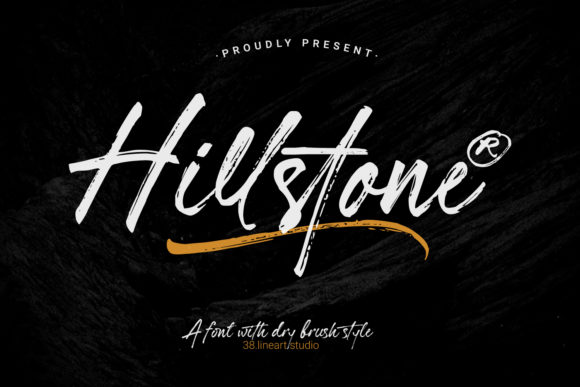
Imagine a font that feels like it was sketched by a friend who’s effortlessly cool—slightly uneven, full of personality, and never trying too hard. That’s Hillstone. It’s not another rigid, over-polished typeface. It’s a friendly, handwritten-style font designed to bring warmth, energy, and authenticity to your projects—without requiring design experience.
What Makes Hillstone Stand Out?
Hillstone is built around natural rhythm—not perfect symmetry. Its letters have subtle variations in stroke weight, slight tilts, and gentle inconsistencies that mimic real handwriting. You’ll notice soft curves, relaxed spacing, and a breezy flow that avoids looking mechanical or sterile. It’s playful without being childish, casual without feeling careless.
This isn’t just about aesthetics. Those small imperfections help humanize your work. When people see text set in Hillstone, they subconsciously register it as approachable, creative, and sincere—qualities that matter whether you’re launching a new product, designing a classroom poster, or sharing a personal blog post.
Where Does Hillstone Shine?
Hillstone works best where personality matters more than formality. Think of it as the go-to font for moments when you want your message to feel personal—not polished to perfection.
- Small business branding: A local café might use Hillstone on its chalkboard menu, takeaway cup sleeves, or Instagram story highlights—giving customers a sense of charm and community.
- Digital content: Bloggers and educators often pair Hillstone with a clean sans-serif (like Inter or Open Sans) for headings—making titles pop while keeping body text easy to read.
- Printed materials: Wedding invitations, handmade greeting cards, workshop handouts, or even DIY recipe cards all gain a tactile, heartfelt quality with Hillstone.
- Social media graphics: Because it’s legible at medium sizes and visually distinct, Hillstone adds flair to quote posts, event announcements, or promotional banners—especially on platforms like Instagram or Pinterest.
It’s also versatile enough for short-form use. You wouldn’t set an entire novel in Hillstone—but a bold headline, a tagline, a call-to-action button, or a hand-drawn-style logo? Absolutely.
Who Benefits Most From Using Hillstone?
If you’re someone who values clarity but dislikes cold, corporate-looking designs, Hillstone fits naturally into your workflow. Freelancers building client websites appreciate how quickly it adds character to hero sections. Teachers use it to make learning materials feel less intimidating. Entrepreneurs testing a new brand identity find it helps convey friendliness and originality—even before launching a full visual system.
Beginners love Hillstone because it doesn’t demand advanced typography knowledge. There’s no need to adjust kerning pairs or fine-tune tracking to get good results. Install it, type something, and immediately feel the difference—no tutorials required.
Realistic Tips Before You Dive In
Like any tool, Hillstone works best when matched to the right job. Here’s what to keep in mind:
- Legibility matters most at smaller sizes. While charming at 24pt or larger, Hillstone can become harder to read below 16pt—especially in long paragraphs or low-contrast settings. Save it for headings, quotes, labels, or short statements.
- Pair it thoughtfully. Hillstone sings when balanced with a neutral, highly readable font for supporting text. Try pairing it with a simple sans-serif for digital layouts or a gentle serif for printed pieces.
- Check licensing early. If you plan to use Hillstone commercially—on merchandise, apps, or client projects—make sure your license covers those uses. Some versions are free for personal use only; others require a one-time purchase for broader rights.
- Test across devices. Handwritten fonts sometimes render differently on Windows vs. macOS or in certain browsers. Preview your design on multiple screens before finalizing.
Simple Ways to Start Using Hillstone Today
You don’t need fancy software to begin. Many free tools support custom fonts:
- Upload Hillstone to Canva (via Brand Kit), then apply it to social templates or presentation slides.
- Use it in Google Slides by installing the font locally and selecting it from the dropdown—great for workshop decks or student-facing materials.
- Add it to your WordPress site using a plugin like Easy Google Fonts—or embed it directly if you’re comfortable editing theme files.
- Try it in Figma or Adobe Express for mockups, mood boards, or quick social assets.
Even if you’re just sketching ideas on paper, let Hillstone inspire your layout choices. Notice how its rhythm suggests spacing, hierarchy, and emphasis—then translate that energy into your final design.
A Font That Grows With Your Ideas
Hillstone isn’t meant to be everything to everyone. It’s not for legal disclaimers, technical manuals, or data-heavy dashboards. But within its sweet spot—where warmth, creativity, and authenticity matter—it delivers real value.
That’s why so many creators return to it again and again: it helps them say more with less. A single line of text in Hillstone can signal “this is made with care,” “we’re not taking ourselves too seriously,” or “you belong here.”
Whether you're naming a new podcast, designing a birthday invitation, updating your portfolio homepage, or brainstorming a brand voice for your side hustle—Hillstone gives you permission to lead with personality. And in a world full of sameness, that kind of distinction isn’t just nice to have. It’s essential.
So go ahead—download Hillstone, open your favorite editor, and try typing something simple: “Hello,” “Thanks,” “Let’s begin,” or even your own name. See how it changes the tone—not just of the words, but of the space around them. That’s the quiet power of a well-chosen handwritten font.