Writing Notes: A Clean Handwritten Font
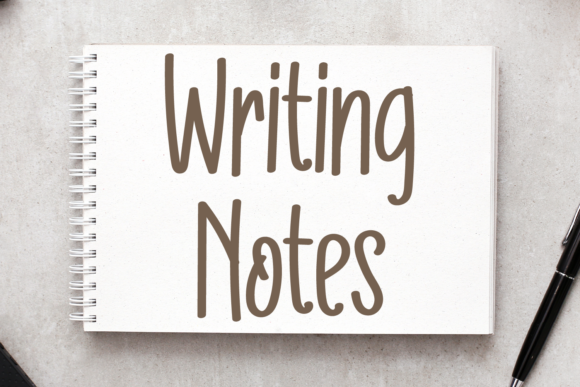
There’s something quietly powerful about a font that feels both personal and precise. Writing Notes is exactly that — a simple, handwritten script font designed with clarity in mind. It doesn’t try to mimic calligraphy or exaggerate flourishes. Instead, it delivers consistent letterforms, balanced spacing, and gentle rhythm — all while preserving the warmth of hand-drawn text. That balance makes it unusually versatile: legible at small sizes, expressive at large ones, and refreshingly uncluttered in any context.
Why Designers Reach for Writing Notes First
Unlike many script fonts that sacrifice readability for personality, Writing Notes keeps both intact. Its lowercase letters have open counters and modest slant — no tight loops or overlapping strokes to trip up the eye. Uppercase characters maintain proportion without dominating. That consistency means less time adjusting tracking or kerning, and more time focusing on message and layout.
It’s also built for real-world use. Whether you’re layering text over busy photography, setting body copy in a print newsletter, or designing a clean Instagram carousel, Writing Notes holds its own without competing for attention. Its neutrality isn’t bland — it’s intentional. It supports your voice instead of overriding it.
Creative Applications You Can Use Today
Here are practical, tested ways people are using Writing Notes — not as a novelty, but as a functional design tool:
- Greeting cards & stationery: Pair it with minimalist layouts and soft color palettes. Try setting names in Writing Notes and details (dates, locations) in a crisp sans-serif like Inter or Lato — the contrast feels thoughtful, not chaotic.
- Digital course materials: Educators and course creators use it for section headers, quote callouts, or worksheet titles. Its friendly tone lowers perceived barriers — especially helpful in beginner-friendly learning paths.
- Small business branding: A local bakery, florist, or pottery studio might use Writing Notes for signage, packaging tags, or email subject lines. It signals care and craft without sounding corporate or overly formal.
- Social media graphics: On platforms where attention spans are short, Writing Notes adds approachability to data-driven posts — think “3 Ways to Start Your Morning” or “Your Weekly Planning Template.” It invites engagement without demanding it.
- Blog headers & digital publications: When used sparingly — say, for article subheadings or pull quotes — it breaks up dense text and creates visual breathing room. Just avoid using it for full paragraphs online; pair it with a highly readable web font for body text.
How Different Users Adapt It With Purpose
Freelancers & creatives: Use Writing Notes to reinforce brand voice in client deliverables — like proposal covers or mood board labels. Because it’s legible and restrained, it reads as confident, not casual. Save it for moments where tone matters more than hierarchy.
Marketers & small business owners: Test it in email subject lines or landing page headlines. In A/B tests, brands report higher open rates when Writing Notes replaces generic script fonts — likely because its clarity feels intentional, not decorative. Just ensure contrast meets accessibility standards (4.5:1 minimum against background).
Educators & content creators: Apply it to printable resources like reflection journals, habit trackers, or classroom posters. Its even stroke weight prints cleanly on standard office printers — no smudging or thin-line dropout. Bonus: students often find it easier to read than tightly spaced or heavily stylized scripts.
Hobbyists & DIY designers: If you’re building a personal project — a zine, recipe blog, or wedding invitation suite — Writing Notes gives structure to handmade aesthetics. Combine it with scanned paper textures or subtle watercolor overlays, but keep backgrounds light and uncluttered so the font remains the focal point.
Keeping Your Work Clear and Audience-Friendly
Even the most versatile font can fall flat without intention. Here’s how to use Writing Notes effectively — every time:
- Respect hierarchy. Use it for primary emphasis only — headlines, titles, short quotes. Never for long blocks of text, navigation menus, or legal disclaimers.
- Control contrast. It shines on light backgrounds with dark text. Avoid reversed type (white on black) unless you increase weight or size significantly — its delicate strokes lose definition otherwise.
- Pair thoughtfully. Match it with neutral, highly legible companions: geometric sans-serifs (like Poppins), humanist types (like Open Sans), or even modest serifs (like Merriweather). Avoid pairing with other scripts — the visual competition dilutes impact.
- Test across devices. Preview how it renders on mobile screens. Some script fonts pixelate or thin out at smaller sizes; Writing Notes holds up well down to 18px, but always verify with your audience’s typical device.
- Stay consistent. If you use it for section headers in a PDF guide, use it for all section headers — not just the ones you like best. Consistency builds recognition and trust.
A Font That Serves Your Ideas, Not the Other Way Around
Writing Notes doesn’t ask you to change your process. It fits into workflows you already have — whether you’re sketching wireframes, drafting social captions, or laying out a quarterly report. Its value lies in what it doesn’t do: it doesn’t distract, overwhelm, or require extensive customization to work.
That reliability is rare. Most handwritten fonts lean hard into either “playful” or “elegant,” limiting where they fit. Writing Notes occupies the middle ground — warm but professional, personal but polished. It’s the kind of typeface that disappears into good design, letting your ideas take center stage.
If you’ve been avoiding script fonts because they felt too fragile, too fussy, or too hard to control — give Writing Notes a test run on a low-stakes project first. Set a headline. Export it. Look at it tomorrow. Chances are, it’ll still feel right — clear, calm, and quietly capable.