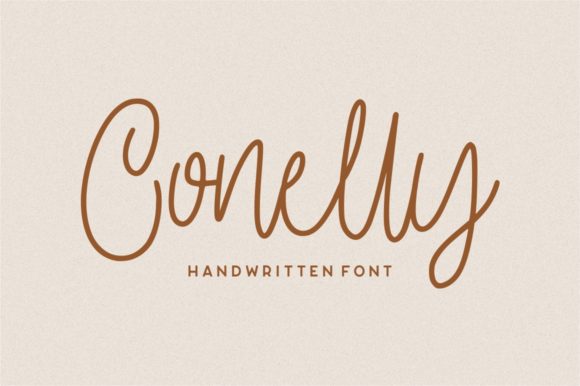
Conelly: A Natural Modern Handwritten Font for Authentic Creative Work
Conelly isn’t just another script font—it’s a deliberate design choice that bridges intention and expression. Built with organic stroke variation, subtle ink texture, and balanced rhythm, Conelly mimics the warmth and nuance of real handwriting without sacrificing legibility or modern usability. It doesn’t shout; it invites. That makes it especially valuable when authenticity matters—not as decoration, but as functional communication.
For professionals who juggle brand voice, content creation, and visual consistency—whether launching a course, designing a newsletter, or refining a product package—Conelly serves as a quiet but powerful signal: this was made thoughtfully, by a person, not a template.
Where Conelly Fits in Your Workflow
Fonts don’t exist in isolation. They’re part of a chain: idea → structure → voice → format → delivery → response. Conelly enters most naturally at the voice and format stages—but its influence ripples backward and forward. Before you even open your design tool, choosing Conelly can clarify tone. If your goal is approachability over authority, warmth over polish, or humanity over automation, selecting Conelly early helps align decisions downstream—from copy phrasing to layout spacing.
During execution, Conelly works best when paired intentionally—not layered over competing visual elements. Its strength lies in contrast: use it for headlines against clean sans-serif body text, or for handwritten-style callouts beside structured infographics. It’s rarely the workhorse font, but it’s often the trust-builder.
Practical Use Cases Across Roles
Marketers and small business owners use Conelly to soften digital touchpoints: email subject lines, landing page subheads, or social media quote graphics. Because it feels personal, it lifts engagement without requiring extra copy—just one well-placed phrase in Conelly can make a CTA feel like an invitation rather than a demand.
Educators and course creators integrate Conelly into downloadable worksheets, reflection prompts, or feedback notes. Students respond more readily to materials that mirror human interaction—and Conelly supports that cue without needing illustration or animation. It also scales well: used sparingly in PDFs or Notion templates, it adds tactile warmth while remaining screen-readable.
Freelancers and designers rely on Conelly for client-facing assets where differentiation matters—think pitch decks with custom section dividers, proposal headers that echo signature style, or branding mood boards where typography sets emotional context before color or imagery do. Its natural flow helps clients visualize tone before final mockups are built.
Bloggers and writers embed Conelly subtly—in pull quotes, chapter dividers, or signature blocks—to reinforce authorial presence. Unlike decorative fonts that distract, Conelly enhances readability *because* it mirrors how people actually write notes to themselves or others. That familiarity builds subconscious rapport.
Compatibility and Technical Integration
Conelly is available in standard OpenType (OTF) and web-ready WOFF2 formats—meaning it works across Figma, Adobe Creative Cloud, Canva (via upload), Google Docs (with add-ons), and modern CSS workflows. No special plugins or licenses are needed for basic use, though commercial projects require a standard desktop or web license.
It pairs cleanly with system fonts like Inter, Roboto, and Georgia—fonts that prioritize clarity and hierarchy. Avoid stacking it with other script fonts or overly ornate serifs; Conelly’s authenticity gets diluted when surrounded by visual noise. Instead, treat it like a single accent color: one strong application carries more weight than repeated, diluted usage.
On the web, load Conelly selectively—only where it adds value. Use @font-face with font-display: swap to prevent layout shifts, and always define fallbacks (font-family: "Conelly", "Segoe UI", system-ui, sans-serif;). This ensures your message remains legible even if the font fails to load.
Preparation and Consistency Tips
Before using Conelly in production, test it at multiple sizes and weights. Its lightest weight shines at 24–36px for headings but loses impact below 18px. The regular weight holds up well in short paragraphs (e.g., testimonials or captions), but avoid full-body text—it’s designed for emphasis, not endurance.
Build a simple style guide snippet for your team or personal toolkit:
- Primary use: Headlines, quotes, signatures, and short labels (≤10 words)
- Avoid: Long paragraphs, data tables, all-caps settings (it loses rhythm), or low-contrast backgrounds
- Spacing tip: Increase letter-spacing by 2–4% in display settings to preserve airflow between characters
- Color guidance: Works best in deep charcoal (#2D3748) or true black on white—or soft off-whites (#FAF9F6)—not light grays
This isn’t about restriction—it’s about honoring what Conelly does well so it reinforces, rather than competes with, your message.
Long-Term Usability and Quality Control
Because Conelly feels personal, it’s easy to overuse. Watch for “authenticity fatigue”: when every headline, button, and testimonial uses the same handwritten tone, it begins to feel performative instead of genuine. Rotate it seasonally or project-by-project—like choosing a different notebook for a new planning cycle.
Track usage across platforms. If Conelly appears in your Instagram Stories but not your email footer, ask why. Inconsistent application weakens perceived intentionality. Align it with moments where human connection matters most—not everywhere, but where it counts.
Also consider accessibility. While Conelly meets AA contrast standards at recommended sizes, avoid relying on it alone for critical information (e.g., error messages or legal disclaimers). Pair it with a highly legible fallback and ensure interactive elements retain sufficient tap/click targets.
Integrating Conelly Into Daily Practice
You don’t need a redesign to start using Conelly meaningfully. Try these low-effort, high-impact integrations:
- In your next Notion dashboard: Replace default headers with Conelly for weekly reflection sections or goal trackers—keeps planning feeling grounded, not transactional.
- In client emails: Use it for your closing line (“All the best,” or “Let’s build something meaningful”)—a tiny detail that signals care without extra time.
- In printed materials: Apply it to hand-signed thank-you cards or workshop handouts. Print vendors support OTF files directly, and the texture translates beautifully to matte paper.
- In video thumbnails: Overlay short phrases (“What I learned,” “My process”) in Conelly—it stands out in feeds without screaming.
None of these require rebranding. Each asks only that you match tone to tool—and let Conelly do what it was built for: make the human element visible, without explanation.
Over time, you’ll notice patterns. You’ll reach for Conelly not because it’s trendy, but because it reliably signals a shift—from broadcast to conversation, from output to offering, from task to intention. That’s not stylistic decoration. It’s workflow alignment.
And that’s why Conelly endures—not as a standalone asset, but as a quiet enabler of better creative habits.