Skinny Cute: A Handwritten Font for Human-Centered Design Workflows
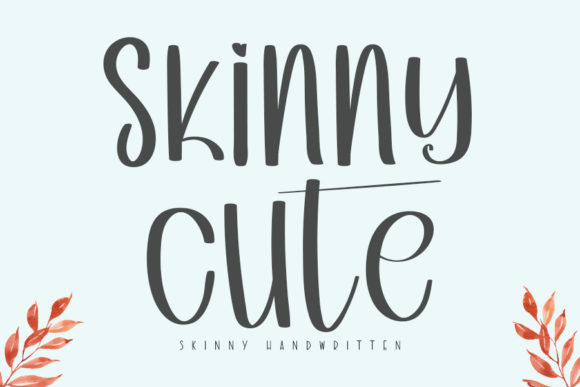
Skinny Cute is a relaxed and friendly handwritten font—light in weight, warm in gesture, and intentionally informal. It doesn’t shout. It leans in. Its subtle irregularities, gentle slant, and open letterforms mimic natural handwriting without sacrificing legibility or digital reliability. That makes it especially valuable not as a decorative afterthought, but as an intentional tool within real-world creative and communication workflows.
Unlike display fonts designed solely for impact or script fonts meant only for elegance, Skinny Cute occupies a practical middle ground: it’s casual enough for authenticity, structured enough for clarity, and versatile enough to move across stages of a project—from early ideation to final delivery.
Where Skinny Cute Fits in the Creative Process
Most fonts enter a workflow at the end—applied during polish or export. Skinny Cute works earlier. Because its tone is so clearly defined (friendly, unhurried, approachable), it helps clarify intent *before* visuals are locked down. When sketching a workshop handout, drafting a client email template, or wireframing a landing page, choosing Skinny Cute signals a deliberate decision about voice and audience relationship—not just aesthetics.
For educators designing learning materials, using Skinny Cute in slide headers or worksheet instructions immediately lowers perceived formality. For small business owners building a brand kit, pairing it with a clean sans-serif (like Inter or Open Sans) creates visual hierarchy rooted in function: Skinny Cute handles warmth and invitation; the sans-serif handles structure and scannability.
Using Skinny Cute Before a Project Begins
Pre-project use is where Skinny Cute reveals unexpected utility. In planning phases—whether outlining a blog series, mapping user journeys, or storyboarding a short video—applying Skinny Cute to notes or low-fidelity mockups encourages a more empathetic, human-first mindset. Its informality gently discourages over-engineering early drafts. You’re less likely to obsess over pixel-perfect alignment when the type itself says, “This is still in motion.”
It also serves as a lightweight consistency anchor. If your team agrees upfront that all internal brainstorm docs will use Skinny Cute for annotations and headings, you create an immediate visual cue for “draft mode”—reducing miscommunication about revision stage or ownership. No need for color-coded status tags when the font itself conveys intention.
During Execution: Integration Without Friction
Skinny Cute integrates cleanly into common tools. It’s available in standard OTF and TTF formats, compatible with Figma, Adobe Creative Cloud, Canva, Google Slides, and most modern design and publishing platforms. No plugins or workarounds needed—just install and assign.
For marketers building social assets, using Skinny Cute in Instagram carousel text overlays or Pinterest pin titles adds approachability without sacrificing readability on mobile. Its light weight pairs well with high-contrast backgrounds, and its x-height ensures characters remain distinct even at smaller sizes (14–16px in body, 24px+ for headings).
Freelancers and bloggers benefit from its versatility across formats: a newsletter header in Skinny Cute sets tone before the first sentence; a downloadable checklist uses it for section labels to reinforce “this is yours to use”; even Notion pages gain personality when applied selectively to page titles or callout blocks—without compromising navigation speed or information density.
Practical Pairing Principles
Effective use hinges on contrast and purpose—not decoration. Here’s what works:
- Pair with neutral sans-serifs (e.g., Inter, Lato, or system fonts like -apple-system) for balance—Skinny Cute brings voice; the sans-serif delivers clarity.
- Avoid pairing with other handwritten or script fonts—it dilutes intention and muddies hierarchy.
- Use sparingly in long-form text: ideal for headlines, pull quotes, labels, buttons, and short captions—not full paragraphs.
- Test contrast rigorously: its light weight demands sufficient background contrast, especially for accessibility compliance (aim for at least 4.5:1 against white or light gray).
After Delivery: Consistency and Long-Term Use
Once a project ships, Skinny Cute continues to support coherence. For publishers releasing a series of zines or educators rolling out quarterly curriculum updates, reusing Skinny Cute across touchpoints builds quiet recognition—readers subconsciously associate its rhythm with your voice or values. That’s not branding by logo alone; it’s branding by texture and tempo.
Long-term usability depends on two things: file management and licensing clarity. Store the font files in a shared, version-controlled assets folder (not buried in a single PSD). Confirm licensing covers your use case—especially if distributing templates, selling digital products, or embedding in web apps. Most standard licenses cover desktop and web use, but always verify before scaling.
Workflow Examples Across Roles
Small business owner launching a local workshop: Uses Skinny Cute in the event poster headline (“Let’s Sketch Ideas Together!”), the registration page button (“Grab My Spot”), and printed name tags—creating continuity from awareness to experience.
Educator preparing hybrid lesson materials: Applies Skinny Cute to slide section dividers and reflection prompts in student-facing PDFs, while keeping instructions and key terms in a readable sans-serif. The contrast guides attention without adding cognitive load.
Freelance UX writer building a design system: Includes Skinny Cute as the designated “human voice” layer—used only in empty-state illustrations, onboarding tips, and microcopy where warmth improves engagement (e.g., “Oops! Try uploading again” vs. “Upload failed”).
What to Watch For
Skinny Cute’s strength is its specificity—so misuse is usually a matter of overextension, not poor quality. Avoid it in contexts demanding authority, urgency, or precision: legal disclaimers, error messages requiring immediate action, data dashboards, or technical documentation. Its relaxed nature can unintentionally soften critical information.
Also consider audience context. While widely accessible, users with dyslexia or low vision may find its light weight and slight irregularity harder to parse in dense settings. Always offer alternatives—like a toggle to switch to a more structured typeface—or ensure critical content remains legible regardless of font choice.
Getting Started Smoothly
Start small. Pick one recurring asset—a weekly team update template, a client proposal cover page, or your personal goal tracker—and apply Skinny Cute there for two weeks. Notice how it affects tone, collaboration pace, and even your own mindset during creation. Does it make feedback feel more conversational? Does it help you prioritize clarity over polish early on?
Then expand deliberately. Add it to your Figma UI kit’s “tone” section. Save a Canva template with preset styles. Bookmark the font file in your cloud drive with a clear naming convention (e.g., “SkinnyCute-Regular_v2.1_OTF”). These tiny setup actions prevent friction later—turning intention into habit.
Skinny Cute doesn’t replace strategy. It supports it—by making warmth, approachability, and human rhythm part of the process, not just the presentation. When your tools reflect how you want to show up—calm, clear, and connected—the work itself tends to follow.