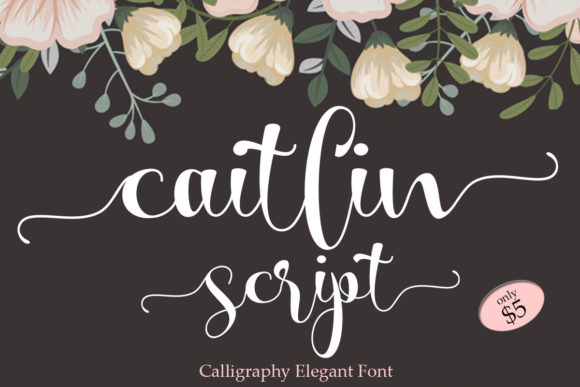
Caitlin Script: Elegant Handwritten Font
If you’ve ever wanted a font that feels like a thoughtful note from a friend—graceful, personal, and quietly charming—you’ll love Caitlin Script. It’s an elegant and dainty handwritten typeface designed with delicate swashes that flow naturally, adding just the right amount of warmth and sophistication to any project.
What Makes Caitlin Script Stand Out
Unlike many script fonts that lean heavily into drama or formality, Caitlin Script strikes a gentle balance. Its letterforms are soft yet confident, with subtle variations in stroke weight and rhythm that mimic real handwriting. The swashes—those graceful, looping extensions on letters like “y,” “f,” or “t”—are sweet and refined, never overwhelming. They add movement and personality without sacrificing readability.
One practical advantage is that Caitlin Script is PUA encoded. That means every alternate glyph, swash, and stylistic variation lives in a predictable location within the font file. You don’t need special software or complex OpenType features to access them—just open your design app (like Adobe Illustrator, Canva, or even recent versions of Word), type normally, and use the Glyphs panel or character map to swap in flourishes as needed. This makes it beginner-friendly while still offering depth for more experienced designers.
Where Caitlin Script Fits Naturally
This font shines in contexts where authenticity and approachability matter. Think invitations, greeting cards, boutique packaging, social media graphics, blog headers, or even simple classroom handouts. Its lightness and charm make it ideal for brands or creators who want to communicate care, creativity, or calm—whether you’re launching a small candle business, designing a wedding suite, or crafting a cozy newsletter for your yoga studio.
For educators, Caitlin Script works beautifully in printable resources—think themed worksheets, reading corner signs, or student award certificates. Its friendly appearance helps reduce visual fatigue for younger learners while still feeling polished enough for parent-facing materials.
Freelancers and small business owners often use it to elevate digital touchpoints: Instagram story text overlays, email subject lines, or even favicon initials. Because it’s legible at moderate sizes and scales well across devices, it bridges print and screen use without losing its essence.
Real-World Uses You Can Try Today
- Wedding stationery: Pair Caitlin Script for names and dates with a clean sans-serif for details—elegant but not fussy.
- Product labels: Use it for brand names or flavor descriptors on handmade soaps, teas, or baked goods.
- Digital content: Add a custom quote graphic to your blog post using Caitlin Script for the quote and a neutral font for attribution.
- Educational tools: Design flashcards or vocabulary posters where the script draws attention to key terms without distracting from meaning.
- Social bios: A short tagline in Caitlin Script—used sparingly—can give your profile a distinctive, human voice.
Things to Keep in Mind Before Using Caitlin Script
While Caitlin Script is versatile, it’s not meant for everything. Its delicate nature means it doesn’t hold up well in very small sizes (under 14pt in print or 16px on screen) or in long blocks of body text. Reserve it for headings, accents, and short phrases where its personality can shine.
Also consider contrast. Because it’s light and flowing, it pairs best with typefaces that ground it—like a crisp geometric sans-serif or a warm, medium-weight serif. Avoid pairing it with other decorative scripts or overly bold fonts; the result can feel cluttered or competing.
If you're using it commercially—say, for client work or to brand your own product—double-check the license. Most versions of Caitlin Script include both personal and commercial use rights, but always confirm before scaling usage across multiple platforms or products.
Getting Started Is Simple
You don’t need advanced typography knowledge to begin. Start by downloading the font and installing it on your computer. Then try these low-pressure experiments:
- Type your name in a design tool and explore the swash alternatives for the first and last letters.
- Create a two-line quote graphic: top line in Caitlin Script, bottom line in a simple sans-serif like Inter or Lato.
- Print a small thank-you card using just three words—“Thank You So Much”—with swashes on the “T” and “S.” Notice how much tone shifts with minimal effort.
Each of these takes under five minutes and shows how much expressive power Caitlin Script brings to even the simplest communication.
Why It Resonates With So Many Creators
At its core, Caitlin Script answers a quiet but widespread need: to stand out without shouting. In a world full of bold headlines and algorithm-driven visuals, there’s real value in something tender, intentional, and hand-crafted—even if it’s digital. It appeals to people who value nuance over noise, clarity over clutter, and connection over conversion.
Whether you're a blogger choosing fonts for your new recipe site, a teacher personalizing classroom decor, or a startup founder defining your brand voice, Caitlin Script offers a way to say “this matters” without saying it loudly. It supports goals like building trust, encouraging engagement, or simply making everyday moments feel more considered.
And because it’s accessible—not just in licensing but in how intuitively it works—you don’t have to be a designer to use it well. You just need a sense of purpose and a little willingness to play.